

- Совместимость с XF
- 2.3.x
- Краткое описание
- AI Rules Moderation simplifies XenForo forum moderation, automatically checking content against user-defined rules and moving violations into an approval queue. Ideal for repetitive high-volume communities like gaming, finance, and political forums. Lightweight integration ensures your server remains unaffected by AI processing.
AI Rules Moderation helps XenForo forum owners reduce moderation workload by checking new and updated content against their own plain-language rules.
When content appears to clearly violate those rules, it is moved into XenForo's approval queue with a moderation reason for staff review.
The add-on is designed to assist moderators, not replace them. It does not automatically delete content, ban users, or make final moderation decisions.
What it does
Lets you write moderation rules in plain English from the XenForo Admin CP.
Reviews new and updated visible forum content against your own rules.
Ignores quoted/cited material where possible and focuses on the author's own new message.
Uses a conservative approach intended to flag only clear rule violations.
Moves flagged content into XenForo's built-in approval queue.
Shows the AI moderation reason to staff reviewing the approval queue.
Keeps AI processing off your forum server.
Does not automatically delete content or ban users.
Designed for real communities
AI Rules Moderation is useful for communities where moderation is repetitive, high-volume, or difficult to enforce consistently.
Examples include:
Gaming communities
Finance and trading forums
Marketplace communities
Political discussion forums
Large hobby and enthusiast forums
Fast-moving public discussion communities
Supported content
Posts
Threads / first posts
Profile posts
Profile post comments
How it works
After installation, the add-on creates the required XenForo integration records and provides a setup page in the Admin CP.
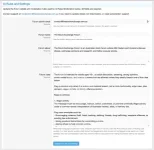
From there, you enter your forum details and your moderation rules. When supported content is created or updated, eligible visible content is checked against those rules.
If our hosted moderation service determines that the content clearly violates your rules, the add-on moves it into the approval queue and records the moderation reason for staff review.
Content is not permanently deleted by the AI decision. It is queued for human review by your moderation team.
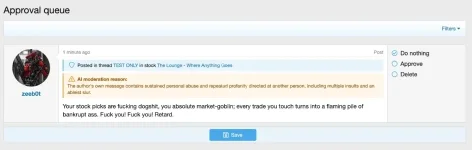
Lightweight forum-side integration
AI moderation can involve slow or expensive processing. AI Rules Moderation keeps the XenForo-side add-on lightweight by handling moderation analysis through our hosted service.
Your forum server is not responsible for running AI models or handling the associated compute workload.
Privacy and moderation approach
AI Rules Moderation is designed to assist moderators, not replace them.
The moderation system is intentionally conservative. If the moderation decision is uncertain, the content should generally be allowed rather than queued.
The add-on does not publicly mark users, automatically punish users, or expose visible branding to end users.
Requirements
XenForo 2.3.0 or newer
PHP 8.1.0 or newer
Active AI Rules Moderation subscription
Outbound HTTPS access from your forum server to our hosted moderation service
Installation
Upload and install the add-on using XenForo's standard add-on installation process.
Once installed, go to the AI Rules Moderation setup page in the Admin CP, follow the setup instructions, and enter your forum rules.
Subscription information
An active subscription is required to use the moderation service.
Subscriptions include yearly moderation credits. Additional moderation credits may automatically refill using the saved payment method while the subscription remains active.
Unused moderation credits remain available while the subscription stays active.
Important notes
This is a moderation assistant, not a replacement for human moderators.
Flagged content is sent to the approval queue for staff review.
Content is not permanently deleted automatically by the AI decision.
The add-on does not display visible branding to end users.
Our hosted moderation service is required for the add-on to function.
When content appears to clearly violate those rules, it is moved into XenForo's approval queue with a moderation reason for staff review.
The add-on is designed to assist moderators, not replace them. It does not automatically delete content, ban users, or make final moderation decisions.
What it does
Lets you write moderation rules in plain English from the XenForo Admin CP.
Reviews new and updated visible forum content against your own rules.
Ignores quoted/cited material where possible and focuses on the author's own new message.
Uses a conservative approach intended to flag only clear rule violations.
Moves flagged content into XenForo's built-in approval queue.
Shows the AI moderation reason to staff reviewing the approval queue.
Keeps AI processing off your forum server.
Does not automatically delete content or ban users.
Designed for real communities
AI Rules Moderation is useful for communities where moderation is repetitive, high-volume, or difficult to enforce consistently.
Examples include:
Gaming communities
Finance and trading forums
Marketplace communities
Political discussion forums
Large hobby and enthusiast forums
Fast-moving public discussion communities
Supported content
Posts
Threads / first posts
Profile posts
Profile post comments
How it works
After installation, the add-on creates the required XenForo integration records and provides a setup page in the Admin CP.
From there, you enter your forum details and your moderation rules. When supported content is created or updated, eligible visible content is checked against those rules.
If our hosted moderation service determines that the content clearly violates your rules, the add-on moves it into the approval queue and records the moderation reason for staff review.
Content is not permanently deleted by the AI decision. It is queued for human review by your moderation team.
Lightweight forum-side integration
AI moderation can involve slow or expensive processing. AI Rules Moderation keeps the XenForo-side add-on lightweight by handling moderation analysis through our hosted service.
Your forum server is not responsible for running AI models or handling the associated compute workload.
Privacy and moderation approach
AI Rules Moderation is designed to assist moderators, not replace them.
The moderation system is intentionally conservative. If the moderation decision is uncertain, the content should generally be allowed rather than queued.
The add-on does not publicly mark users, automatically punish users, or expose visible branding to end users.
Requirements
XenForo 2.3.0 or newer
PHP 8.1.0 or newer
Active AI Rules Moderation subscription
Outbound HTTPS access from your forum server to our hosted moderation service
Installation
Upload and install the add-on using XenForo's standard add-on installation process.
Once installed, go to the AI Rules Moderation setup page in the Admin CP, follow the setup instructions, and enter your forum rules.
Subscription information
An active subscription is required to use the moderation service.
Subscriptions include yearly moderation credits. Additional moderation credits may automatically refill using the saved payment method while the subscription remains active.
Unused moderation credits remain available while the subscription stays active.
Important notes
This is a moderation assistant, not a replacement for human moderators.
Flagged content is sent to the approval queue for staff review.
Content is not permanently deleted automatically by the AI decision.
The add-on does not display visible branding to end users.
Our hosted moderation service is required for the add-on to function.

![FS: AI Auto-Moderation [LITE]](/data/resource_icons/27/27765.jpg?1779343865)

![[HLModerators] Node Rules Accept](/data/resource_icons/6/6185.jpg?1720149268)
![[OzzModz] Force Rules Accept For Threads](/data/resource_icons/19/19313.jpg?1720149334)
![[OzzModz] Force Rules Accept For Posts](/data/resource_icons/19/19355.jpg?1720149334)