
![[ITD] Remove User Signatures from Selected Nodes - XF 2.0 to 2.3](/data/resource_icons/27/27859.jpg?1781059558)
- Совместимость с XF
- 2.3.x
- Краткое описание
- Remove user signatures from specific XenForo nodes with ease. This lightweight addon lets you maintain a clean look in areas like announcements and marketplaces. Compatible with 2.0-2.3, easy config via Admin CP, no performance hit. Download now!
[ITD] Remove User Signatures from Selected Nodes is a clean, lightweight and stable addon that allows you to completely remove user signatures from any specific forums/nodes while keeping them visible in other areas.
This addon is especially useful for announcement forums, support sections, selling/marketplace forums, or any area where you want a cleaner and more professional appearance.
Key Features
Compatibility
Installation Instructions
Recommended: Always take a backup of your site before installing any addon.
License Agreement
ITD Standard License
This is a Free Addon developed by Mian Shahid (ITD).
✅ You are allowed to:
❌ You are not allowed to:
Note:
Premium / Paid versions of this and other addons may be released in the future with additional features and stricter licensing terms.
---
Copyright © 2026 Mian Shahid (ITD) — All Rights Reserved.
By downloading or using this resource, you agree to abide by the above terms.
SCREEN SHOTS
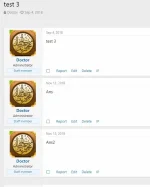
Before:

This addon is especially useful for announcement forums, support sections, selling/marketplace forums, or any area where you want a cleaner and more professional appearance.
Key Features
- Remove signatures from selected nodes only
- Full compatibility with XenForo 2.0, 2.1, 2.2 and 2.3
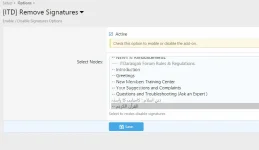
- Easy configuration via Admin Control Panel
- Supports comma separated Node IDs
- Very lightweight with no performance impact
- Stable and well-tested template modifications
Compatibility
- XenForo 2.0
- XenForo 2.1
- XenForo 2.2
- XenForo 2.3
Installation Instructions
- Download the addon zip file and extract it.
- Log in to your XenForo Admin Control Panel.
- Go to Add-ons → Install Add-on
- Upload the XML file from the addon package.
- After successful installation, go to Options → [ITD] Remove Signatures
- Enable the addon and enter the Node IDs (comma separated) where you want to hide signatures.
- Go to Development → Rebuild Templates and run the rebuild.
Recommended: Always take a backup of your site before installing any addon.
License Agreement
ITD Standard License
This is a Free Addon developed by Mian Shahid (ITD).
✅ You are allowed to:
- Use this addon on any number of your own websites (personal or commercial use)
- Customize the addon for your own needs
- Use it on both live and test installations
❌ You are not allowed to:
- Redistribute, resell, share, or leak this addon (free or modified)
- Remove or hide the copyright notice / developer credits
- Rebrand or release this addon (or any modified version) as your own
Note:
Premium / Paid versions of this and other addons may be released in the future with additional features and stricter licensing terms.
---
Copyright © 2026 Mian Shahid (ITD) — All Rights Reserved.
By downloading or using this resource, you agree to abide by the above terms.
SCREEN SHOTS
Before:
![[ITD] Скрыть Аватар (Лайт)](/data/resource_icons/27/27880.jpg?1781425296)


![[AndyB] Remove allow users to](/data/resource_icons/15/15018.jpg?1732477504)
![[AndyB] Remove user blurb](/data/resource_icons/24/24271.jpg?1743490644)
![[cXF] Remove username link](/data/resource_icons/1/1127.jpg?1746114273)