Magento 2 WebP Изображения | Автоматический Конвертер WebP от Magefan

Magento 2 WebP Изображения | Автоматический Конвертер WebP от Magefan 2.5.7 Nulled

Нет прав на скачивание
Присоединился
Янв 20, 2022
Сообщения
120
Оценка реакций
71
Credits
$133
Магнитро 2 Расширение WebP изображений улучшает производительность вашего онлайн-магазина, автоматически преобразуя и предоставляя ваши товарные изображения в современном формате WebP. WebP обеспечивает более высокую сжимаемость по сравнению с традиционными форматами, такими как JPEG и PNG, что приводит к быстрому загрузке страниц и улучшенному пользовательскому опыту без потери качества изображений.https://magefan.com/magento-2-webp-optimized-imagesКлючевые характеристики:
  • []*[]Автоматический конвертация в формат WebP:Семантически преобразуйте все изображения продуктов и категорий в формат WebP без ручного вмешательства.[]*[]Fallback Support:Автоматически подгружает оригинальные изображения в формате JPEG/PNG для браузеров, не поддерживающих WebP, обеспечивая полную совместимость.[]*[]Улучшенная скорость сайта:Уменьшите размеры изображений на до 30-50%, значительно улучшив скорость загрузки сайта и оценку поискового ранжирования.[]*]Легкое настройка:Управление настройками расширения напрямую из панели администрирования Magento с пользовательским интерфейсом.[]*[]SEO Глубокий:Скореечные загрузки изображений способствуют лучшим результатам в поисковых системах и снижению показателя отказов при входе.[]*[]Нет влияния на оригинальные изображения:Оригинальные изображенные файлы остаются неизменными, обеспечивая безопасное и обратимое оптимизация изображений.[]*[]Поддерживает Множество Типов Изображений:Работает с изображениями продуктов, категорий, страницами CMS и блоками.
Пр poleznościach:
  • []Улучшите опыт покупателя с помощью быстрого загрузки страницы.[]Увеличьте оценки Google PageSpeed Insights и Core Web Vitals.[]Уменьшите потребление бандwidth и нагрузку на серверы.[]Полностью совместим с последними версиями Magento 2.
 
Вложения
Последнее изменение модератором:
Can you provide a cracked version?
 
Yes, I replaced the Community moudle with Magefan Community 2.2.17 Nulled moudle,
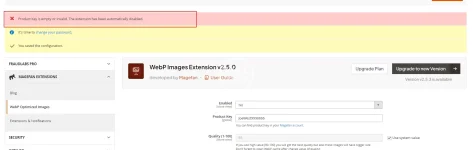
And I deleted the "generated" and "var" directories. After recompiling, the Webp still prompted that it needed to be activated, even though I entered any key in webp Configuration stage.Просмотреть вложение 108121
Hold On ,i will check it.new version this package have more vaild .now please modify code from

PHP:
  final public function validate($data)
    {
        if (isset($data[$this->getModule()])) {
            return !empty($data[$this->getModule()]);
        }
        $k = $this->getKey();
      $result =true;
        return $result;
    }
to
Код:
  final public function validate($data)
    {
          return true;
    }
on file
module-community-2.2.17\Model\Section.php
to fix your issue .
 
Последнее изменение:
Hold On ,i will check it.new version this package have more vaild .now please modify code from
稍等,我去检查一下。这个包的新版本有更多有效的功能。现在请修改代码。

PHP:
  final public function validate($data)
    {
        if (isset($data[$this->getModule()])) {
如果 (isset($data[$this->getModule()])) { 
            return !empty($data[$this->getModule()]);
        }
        $k = $this->getKey();
      $result =true;   $result = true;
        return $result;
    }
to
Код:
  final public function validate($data)
    {
          return true;
    }
on file 在文件中

to fix your issue .
解决你的问题。
Thanks for you tell,

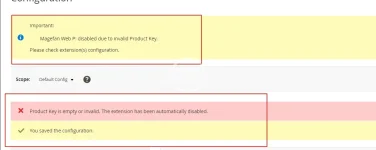
I completed the above modifications and recompiled the code. However, when I accessed the backend page, I found that there was still the error message "Magefan Web P: disabled due to invalid Product Key. Please check the configuration of the extension(s)." Even after I cleared the files and cache and recompiled again, it didn't work.


Besides,
I attempted to remove: </field> <field id="key" translate="label" type="text" sortOrder="30" showInDefault="1" showInWebsite="0" showInStore="0">
<label>Product Key</label>
<frontend_model>Magefan\Community\Block\Adminhtml\System\Config\Form\ProductKeyField</frontend_model>
</field>

On files /Magefan/WebP/etc/adminhtml/system.xml

But,it still didn't work.


1755500547171.webp
 
Thanks for you tell,

I completed the above modifications and recompiled the code. However, when I accessed the backend page, I found that there was still the error message "Magefan Web P: disabled due to invalid Product Key. Please check the configuration of the extension(s)." Even after I cleared the files and cache and recompiled again, it didn't work.


Besides,
I attempted to remove: </field> <field id="key" translate="label" type="text" sortOrder="30" showInDefault="1" showInWebsite="0" showInStore="0">
<label>Product Key</label>
<frontend_model>Magefan\Community\Block\Adminhtml\System\Config\Form\ProductKeyField</frontend_model>
</field>

On files /Magefan/WebP/etc/adminhtml/system.xml

But,it still didn't work.


Просмотреть вложение 108136
No .what is magento version?clear var folder and then try it .i can not tested faild
2025-08-18_154124.webp
 
Последнее изменение:
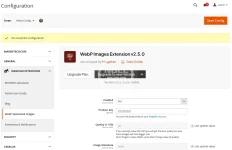
Yes, I did clear the var and generated folder, but it still didn't work. My Magento 2 version is 2.4.7-p7.
 
Yes, I did clear the var and generated folder, but it still didn't work. My Magento 2 version is 2.4.7-p7.
Tested version number was 2.4.8 ,no find any issue .if do not modify any code it is work too with new .
Код:
  final public function validate($data)
    {
        if (isset($data[$this->getModule()])) {
            return !empty($data[$this->getModule()]);
        }
        $k = $this->getKey();
      $result =true;
        return $result;
    }
this code only was touch issue when upgrading was happen,make sure your files floder permission .and remove var folder,run setup:up and then tested-
 
Tested version number was 2.4.8 ,no find any issue .if do not modify any code it is work too with new .
Код:
  final public function validate($data)
    {
        if (isset($data[$this->getModule()])) {
            return !empty($data[$this->getModule()]);
        }
        $k = $this->getKey();
      $result =true;
        return $result;
    }
this code only was touch issue when upgrading was happen,make sure your files floder permission .and remove var folder,run setup:up and then tested-
Sometimes it is necessary to restart PHP to update OPCache data. Even if you need to restart Apache or nginx. If your disk has M2 cache, sometimes you also need to restart the server,linux will cache file when lots of files was update or delete .you can find delete ALL twice ,it was really deleted
 
Вверх